# XRi.js - Spatial DOM & WebXR SDK (Full Reference) > XRi.js is a zero-config spatial computing and WebXR JavaScript library. It provides a 5-level progressive enhancement for AR/3D web integration, a built-in Unity (Vuplex) bridge, and native P2P multiplayer via WebSockets with remote execution capabilities. ## 1. Core Architecture The SDK exposes a global `window.XRi` instance (based on `XRiBridge`) and returns `XRiObject` instances for specific 3D model manipulation. All asynchronous manipulation methods return Promises. * **Mandatory Import:** `` * **Asset Rule:** All 3D models (.glb, .usdz) MUST use absolute `https://` URLs. * **Target Platforms:** PC (Model-viewer), iOS (Quick Look), Android Mobile (WebXR), Headsets (Full WebXR), Native XRi App (Full Physics Unity Bridge). ## 2. Global Initialization & Multiplayer - `XRi.initWebXR(enable = true, customUrl = "https://xri.onl/web/")`: Initializes the environment. If the native wrapper (Vuplex) is missing, it automatically triggers the URL-based fallback to the WebXR viewer. - `XRi.initMultiplayer(manualSession = null, url = 'wss://xri.onl/multiplayer', mode = 'append')`: Connects to the WebSocket room (reads `?session=...` from URL by default). Enables state synchronization and Remote Execution (`eval` of server events). ## 3. Global API (XRi Bridge) These methods control the scene and spawn objects. By default, `isGlobal = true` broadcasts the command to all connected users in the multiplayer session. - `XRi.spawn(id, url, scale = 0.1, position = {x:0.3, y:1, z:0.5}, rotation = {x:0,y:0,z:0}, usePreciseCollider = false, isGlobal = true)`: Spawns a 3D object and triggers fallbacks if needed. Returns a Promise resolving to an `XRiObject`. - `XRi.getClassById(id, isGlobal = true)`: Returns an `XRiObject` instance to manipulate an existing entity. - `XRi.clearAll(isGlobal = true)`: Resets the entire scene. - `XRi.getAllObjects()`: Returns an array of all objects currently in the scene. - `XRi.generateId()`: Returns a random string ID (e.g., "id_abc1234"). ## 4. Instance API (XRiObject) Manipulate specific spawned objects. Almost all methods accept a `duration` (in seconds) for smooth transitions. - `.move(direction, duration = 1.0)`: Moves the object relative to its position. - `.rotate(rotation, duration = 1.0)`: Rotates the object (accepts a number for Y-axis or `{x, y, z}`). - `.setPosition(position, duration = 0)`: Moves the object to absolute world coordinates. - `.resetRotation(duration = 1.0)`: Resets to {0,0,0} rotation. - `.setScale(targetScale, duration = 1.0)`: Scales the object smoothly. - `.zoom(targetScale, duration = 1.0)`: Relative scaling/zooming. - `.lookAt(enable = true)`: Forces the object to face the user's camera. - `.setGravity(useGravity = true)`: Enables/disables physical gravity. - `.setGrabbable(isGrabbable = true)`: Allows the user to grab the object with hand-tracking/controllers. - `.setVisible(isVisible = true)`: Toggles visibility. - `.parent(parentId)`: Links the current object as a child of `parentId`. - `.startAnimation(animationName = "")`: Plays an embedded glTF animation. - `.stopAnimation()`: Stops the current animation. - `.getPosition()`: Returns the absolute `{x, y, z}` coordinates. - `.destroy()`: Removes the object from the scene. ## 5. Interaction Callbacks (Global Scope) Define these functions on the `window` object to handle physical interactions triggered by the Unity Bridge: - `window.handleSelection(id)`: Triggered via "GRAB_START" when a user grabs an object. - `window.handleRelease(id)`: Triggered via "GRAB_END" when a user releases an object. - `window.handleAllObjects(objectsArray)`: Callback for the GET_ALL_OBJ request. ## 6. Official Ecosystem Links - App Hub & Sandbox: https://app.xri.onl - Dev Hub & Tools: https://dev.xri.onl - Tools: QR Builder (/qr.html), P2P Chat (/P2P.html), Remote Execution (/remote_execution.html), Action Builder (/action-builder.html), 3D Texture Editor (/editor.html). ## 7. Code Example: Spawn & Physics ```javascript // Example: Spawning an object with gravity and grabbing enabled await XRi.initWebXR(true); const myObj = await XRi.spawn("cube1", "[https://example.com/cube.glb](https://example.com/cube.glb)", 1.0, {x:0, y:2, z:-1}); await myObj.setGravity(true); await myObj.setGrabbable(true); window.handleSelection = (id) => { console.log(`${id} has been grabbed!`); }; //HTML FULL

Gourmet Experience

Tap a dish in AR to view ingredients and order.

Starter One

Premium Angus beef and melted cheddar.

€ 18.00
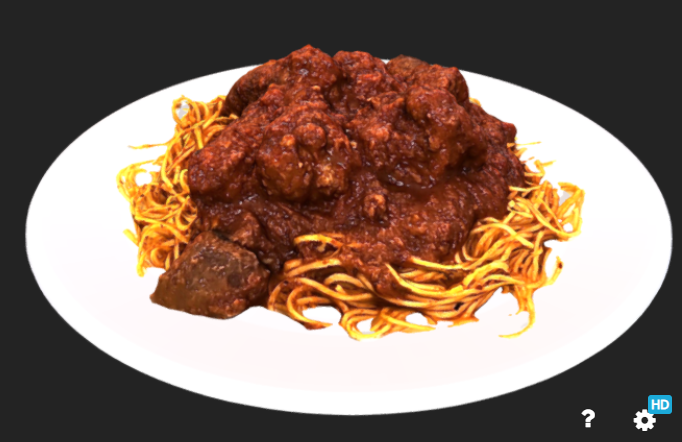
Main Dish

Homemade pasta with fresh cherry tomatoes.

€ 24.50
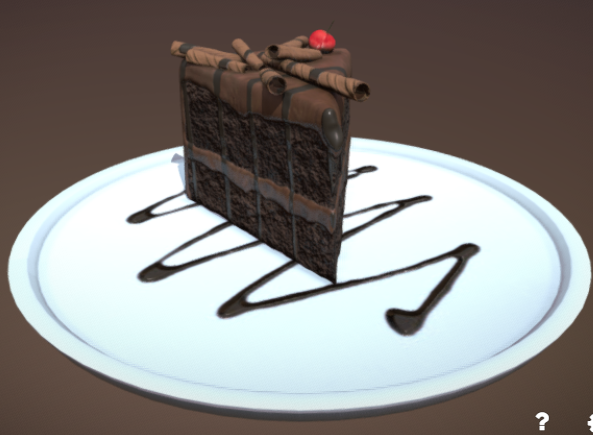
Chef's Dessert

Dark chocolate mousse with pistachio.

€ 12.00
//LIbrerie di test XRi Burger Test

XRi Burger Lab v2.1

Core Actions
Data & Debug
```